
One console that shows what needs you

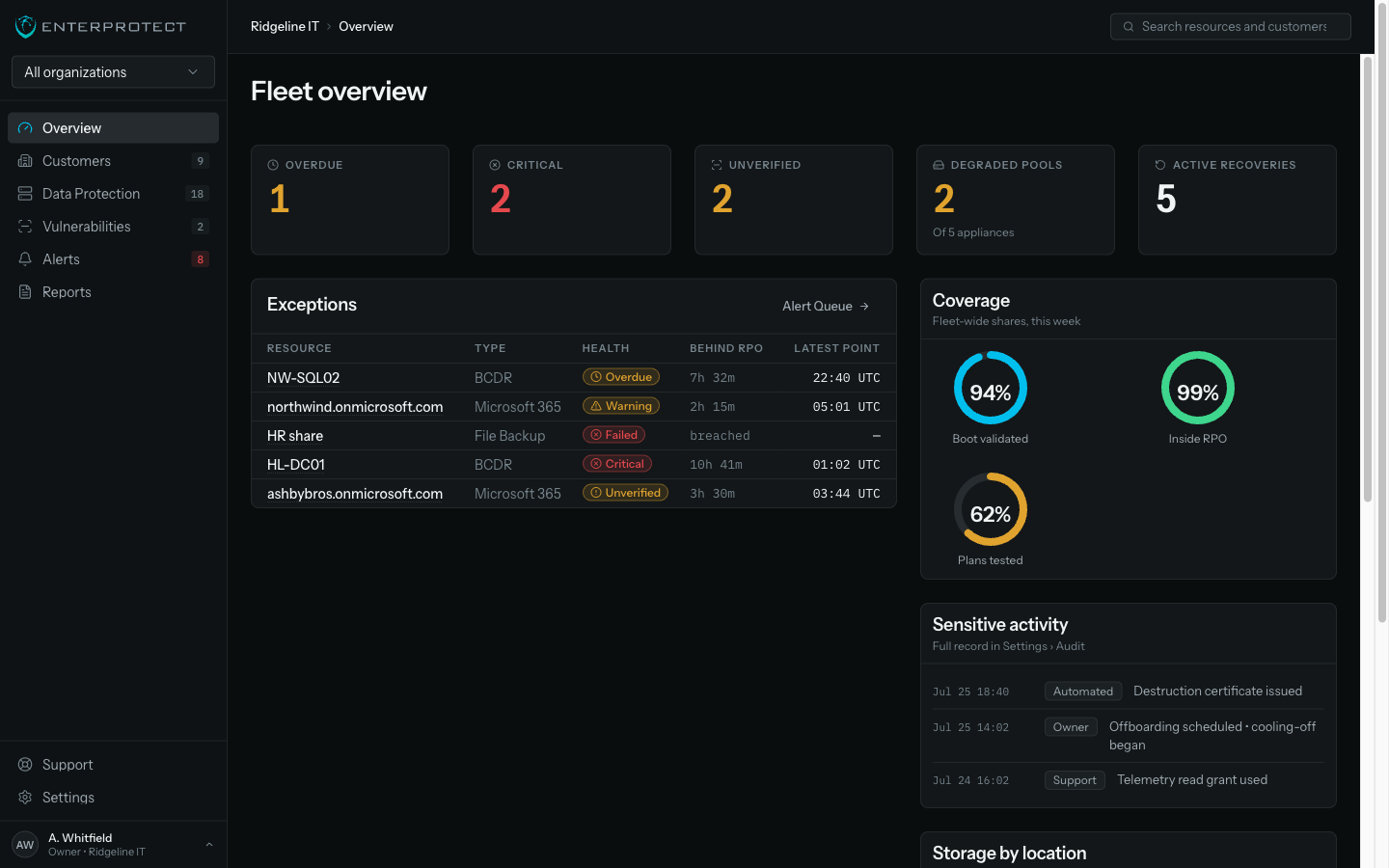
One alert queue across every customer, with one root-cause explanation per problem. Protection state and health stay separate, and restores end in evidence.

Protected resources
SRV-DC01
Hollis & Verne LLP • BCDR
ProtectedHealthy
Microsoft 365 tenant
Aldergrove Dental • 84 users
ProtectedHealthy
FS-02
Cormorant Logistics • File Backup
ProtectedNeeds attention

Three products, three consoles, one morning

Backup in one portal, M365 in another, scanning in a third. Every morning your team reconciles three queues by hand, and the exception that matters is in whichever one nobody opened first. Your best technician spends their attention on the tooling instead of the client.

What that costs you

CriticalBackup chain broken on FS-0212 downstream alerts folded in
  • Alerts nobody can triage

    One failure produces a dozen notifications across two tools, so the queue trains your team to skim.

  • Statuses that mean different things

    Green in one portal and green in another are not the same claim, and only your senior technician knows which is which.

  • Restores relearned every time

    Each product has its own restore flow, so the technician who does it twice a year does it slowly.

How the console works

  • Evidence over dashboards

    Signed recovery-point manifests, restore evidence exports, and destruction certificates.

  • Roles that mean something

    Backup duty is separate from the right to read customer data. Five fixed roles, previewable before you assign them.

  • One restore grammar

    Point picker, browse, select, destination. Learn it once for mail, files, sites, Teams and servers.

  • PSA ticketing built in

    Create or link tickets from any alert, routed by alert type to the right board in your PSA.

The console overview showing fleet health, exceptions, and what needs attention

Three steps to one morning routine

  1. Connect

    Bring in a book of Microsoft tenants with one GDAP consent, and enrol machines through your RMM.

  2. Work the queue

    One alert list across every customer, grouped by root cause, with tickets routed to your PSA.

  3. Report

    Send each client evidence from the same surface your team already works in.

See a morning in the queue

Bring your own scenario to the walkthrough. We will run the triage and the restore, and you keep the evidence it produces. Most teams leave with a shorter morning than the one they arrived with.

What we commit to

  • One console for every product, with no separate portal to log into.
  • Backup duty never carries the right to read client data.
  • Every restore closes with evidence you can hand to the client.

Followed an old link? The security product that used to live at this address was retired. EnterProtect builds backup and disaster recovery for MSPs.

See a morning in the queue

Bring your own scenario. We run the triage and the restore, and you keep the evidence.